UnityRuntimeExplorer: Live MCP-powered inspector for Windows Unity games
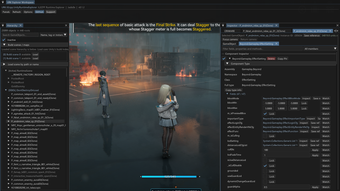
UnityRuntimeExplorer from Jadis0x is a runtime inspector and Model Context Protocol (MCP) server for Windows Unity games, designed to expose live engine state to external tools. The app lets developers and AI clients browse scene hierarchies, inspect GameObjects and components, and edit managed fields while the game runs. Key elements include an MCP-compatible server for AI integration, native C++ implementation via URKit, and support for both Mono and IL2CPP projects. It targets developers, modders, and AI researchers needing live, interactive debugging and automated scene analysis.
What tasks can you actually use it for?
The explorer offers real-time scene inspection and on-the-fly modification without rebuilding the game, exposing hidden roots and DontDestroyOnLoad objects. Users can search GameObjects by name, tag, or instance ID and enumerate attached components. Runtime value editing reads and writes managed fields and properties, and component management can enable, disable, add, or delete components when the target runtime supports those operations. These capabilities fit debugging, live tuning, and automated scene analysis workflows.
How reliable are automated inspections and edits?
The app exposes runtime state to AI models through an MCP server, enabling external agents to generate inspection reports and suggested changes. Because integration performs direct reads and writes of managed members in the running process, developers should validate automated edits before applying them to important builds. IL2CPP reverse engineering support increases visibility into managed binaries, yet suggested actions remain proposals that require human review in complex scenarios.
What inputs and connections does it require?
The explorer runs as a URKit mod and ships a dedicated MCP server executable, URK_UnityRuntimeExplorer_McpServer.exe, which communicates using JSON-RPC over stdio. It auto-discovers running instances through a local bridge directory or accepts a manual process ID for attachment. The app is limited to Windows-based Unity titles and requires an MCP-compatible client, for example Claude Desktop or Cursor, to enable AI-driven inspection and control.
Is it suitable for non-technical users or casual modders?
The developer's background in reverse engineering and modding informs the workflow: the project builds on URKit and assumes familiarity with native mod installation and process attachment. That orientation makes the tool more appropriate for programmers, modders, and researchers comfortable with binary inspection and AI client integration. Newcomers can explore game state, but interpreting IL2CPP structures and safely applying automated edits requires technical knowledge to avoid misapplied changes.
A practical option for technically skilled developers who accept mod-based workflows
The explorer is a practical choice for technically proficient developers and researchers who need live AI-assisted runtime inspection. Expect to validate automated edits before applying them and run experiments in isolated test builds. Treat AI-generated changes as suggestions that require manual verification; include explicit validation steps in any workflow that applies runtime edits to reduce risk when experimenting with live game state.